AI Tools
Use Claude and ChatGPT to Calc Pokémon Champions Damage
7 min read
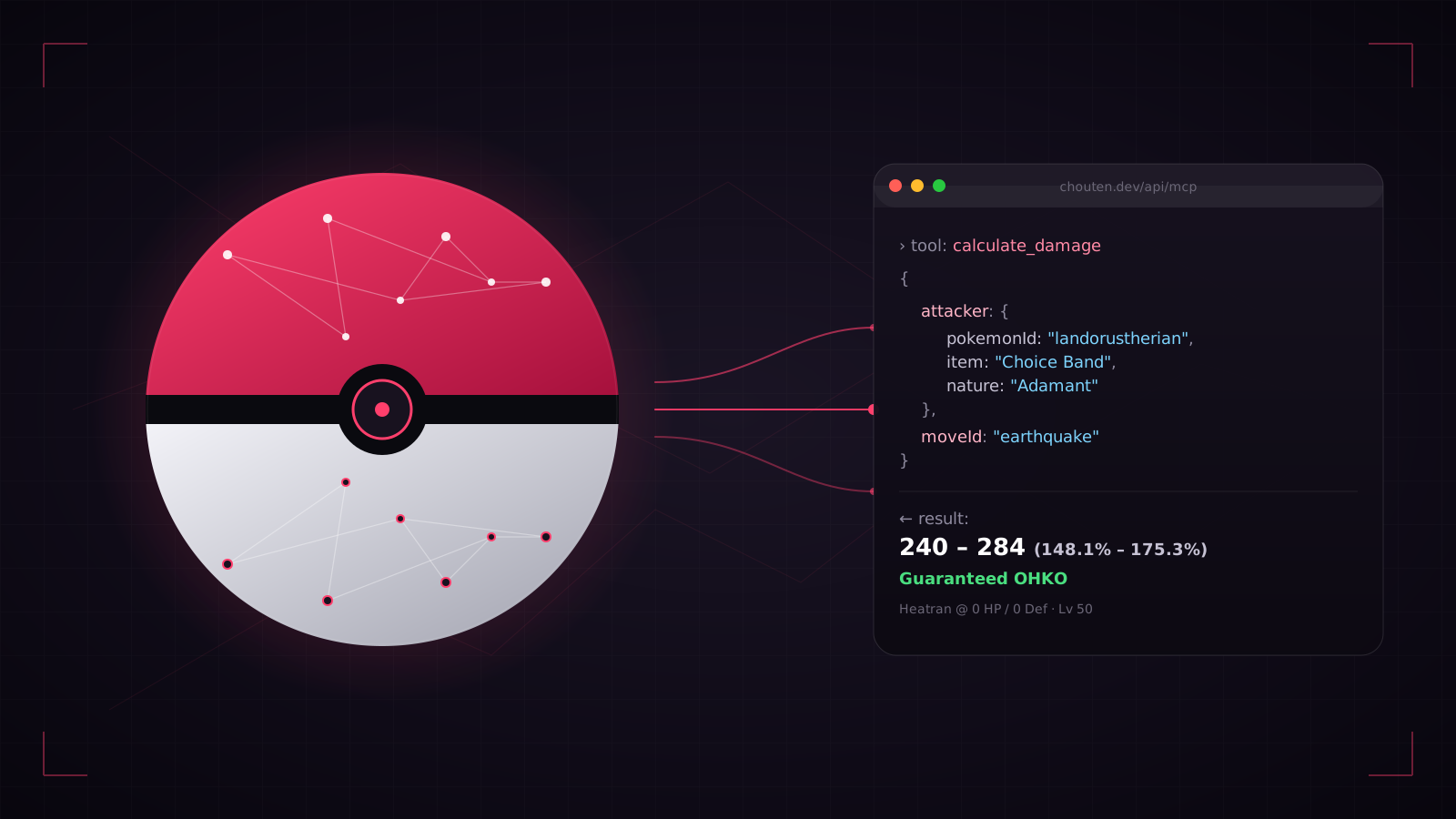
Chouten runs a remote Model Context Protocol (MCP) server at chouten.dev/api/mcp. Point Claude, ChatGPT, Cursor, or any MCP-compatible AI client at that URL and it can call the same calculate_damage function that powers the interactive calculator — the numbers the model returns are identical to the UI down to the last roll. No plugin, no scraping, no API key.
This guide covers what MCP is, which eight tools the server exposes, how to connect each major AI client, and when using the AI is actually faster than clicking through the calculator yourself.
What is MCP, and why does it matter for damage calcs?
Model Context Protocol is an open spec from Anthropic that lets AI assistants call external tools at inference time. An MCP server publishes a list of callable functions — each with a name, a description, and a JSON-Schema-validated input — and the model decides when to invoke them based on the user's prompt.
For a competitive Pokémon site this is the cleanest possible shape. The damage formula is pure math: attacker stats, defender stats, move base power, a random roll, a handful of multipliers. When you ask Claude "does Choice Band Landorus-T Earthquake OHKO 0/0 Heatran?", the model doesn't need to approximate — it calls calculate_damage with the exact inputs, reads back the 16 damage rolls, and tells you whether Heatran lives. The answer is not a probability the model pattern-matched from training data; it is the same number the browser calculator would show.
Why reach for the AI instead of the UI?
The browser calculator at /damage-calc is faster for a single matchup once you know exactly what you want to type. The AI path shines in three scenarios:
- Fuzzy queries that need resolving first. "Is there a Garchomp EV spread that outspeeds Choice Scarf Landorus-T while still OHKOing Heatran?" is a chain of lookups a human would do in several tools. The model handles it in one prompt.
- Comparisons across a list. "Run Modest Specs Latios Draco Meteor against every 4× weak Dragon in the format and show the ones that aren't guaranteed OHKOs." The model iterates the calculator for you.
- Explaining why a number is what it is. The browser shows damage; the AI can narrate STAB, type effectiveness, burn status, and item multipliers — useful when teaching a teammate or sanity-checking your own spread.
For a single "does X KO Y" question you know how to express, the web UI is still quicker. Pick the right tool.
The eight tools, and what they return
The calc half:
| Tool | Inputs | Returns |
| ------------------ | ---------------------------------------------------------------------------------- | ----------------------------------------------------------------------------- |
| calculate_damage | attacker, defender (pokemonId, nature, ability, item, EVs), moveId, optional field | Min/max damage, percent range, 16 rolls, KO label, defender HP, speed summary |
| search_pokemon | query (substring), limit | id, name, types, base stats, abilities, move-pool size, mega forms |
| search_moves | query, type, category, limit | id, name, type, category, base power, accuracy, short description |
| search_items | query, limit | name, short description |
| list_natures | (none) | All 25 natures with their +/- stat modifiers |
The meta half — all three return the same usage numbers shown on /meta and the popular-builds blocks in counter guides:
| Tool | Inputs | Returns |
| -------------------- | ----------------- | ------------------------------------------------------------------------------------------- |
| get_meta_stats | limit? | Verified-teams Pokémon usage + held-item usage (count + percentage), sorted by count desc |
| get_popular_builds | pokemonId, limit? | Top builds for that Pokémon — item, ability, nature, moves, EV spread, count and percentage |
| get_teammates | pokemonId, limit? | Most frequent verified-teams partners with co-occurrence count and percentage |
The lookup tools exist because the AI needs to resolve names like "Landorus-T" or "Earthquake" to canonical ids (landorus-therian, earthquake) before calling calculate_damage. Most models will chain search_pokemon → search_moves → calculate_damage on their own without being prompted. For meta queries, the chain is usually search_pokemon → get_popular_builds → calculate_damage — the model discovers the canonical slug, pulls the #1 build, then plugs those exact stats into the calc.
Connecting Claude.ai (easiest, no install)
Claude.ai on the web natively supports remote MCP servers as Custom Connectors. Setup is paste-the-URL short:
- Open Claude.ai → Settings → Connectors.
- Click Add custom connector.
- Name it
Chouten, pastehttps://chouten.dev/api/mcpas the URL, and save. - Start a new chat, toggle the Chouten connector on, and ask a damage question.
The first time you invoke the connector in a chat, Claude will ask for permission to run the tools — approve it once and subsequent calls in the same conversation are automatic.
Connecting Claude Desktop
Claude Desktop is stdio-only, so you need the lightweight mcp-remote proxy. Edit your claude_desktop_config.json (Settings → Developer → Edit config) and add:
{
  "mcpServers": {
    "chouten": {
      "command": "npx",
      "args": ["-y", "mcp-remote", "https://chouten.dev/api/mcp"]
    }
  }
}
Restart Claude Desktop. In the chat, the Chouten tools will appear under the hammer/tools menu, and Claude will call them automatically when the prompt is a damage question.
Connecting Cursor, Zed, and ChatGPT
Cursor / Zed / Windsurf all accept a URL directly. In Cursor, open Settings → MCP → Add new MCP and paste:
{
  "mcpServers": {
    "chouten": {
      "url": "https://chouten.dev/api/mcp"
    }
  }
}
ChatGPT routes MCP servers through the Apps SDK and custom GPT tooling. OpenAI's current docs at platform.openai.com/docs/mcp walk through registering a remote MCP server as a connector. ChatGPT Pro and Team accounts have UI for this today; availability on lower tiers is gradual.
The live setup page at /mcp keeps the exact connector URLs and copy-pasteable snippets up to date — if you get stuck, start there rather than this article.
Example prompts that work well
Paste these directly into any connected client. All of them exercise the calculator and return competitive-grade answers:
- "What damage does Choice-Band Adamant Landorus-T Earthquake do to a 0/0 Heatran with no item?"
- "Is Modest Specs Latios Draco Meteor a guaranteed OHKO on 0 HP Garchomp in rain?"
- "Compare Timid vs Modest on Alakazam — does Psychic still 2HKO 252/0 Rotom-W?"
- "Find me a Landorus-T spread that outspeeds Jolly Garchomp and still 2HKOs 252/4 Heatran with Choice Band Earthquake."
- "What's the lowest SpA investment on Charizard-Mega-Y that guaranteed OHKOs Ferrothorn with Fire Blast in sun?"
- "What are the top 10 Pokémon on the Pokémon Champions verified-teams ladder, and what items are showing up most?"
- "Pull Garchomp's #1 popular build and tell me whether Mega Froslass Ice Beam OHKOs it."
- "Who does Incineroar usually pair with on Pokémon Champions verified teams?"
The last two are the interesting ones — they make the AI search the EV space using the calculator as a ground truth, which is much faster than manually clicking through spreads in the UI.
What the server does — and doesn't — model
The calculate_damage tool implements the same formula as the browser calculator, which covers the factors that matter in >95% of competitive queries:
- Level 50, 31 IVs hardcoded (Pokémon Champions defaults).
- EVs capped at 32 per stat (Pokémon Champions rule).
- Nature +/- stat modifiers, burn, STAB, type effectiveness.
- Weather (sun/rain boost the matched-type damage; sand/snow included for completeness even though they don't affect damage directly).
- Doubles spread multiplier (0.75×) and critical hits (1.5×).
- Held item boosts (Choice Band/Specs, Life Orb, type-boosting items, mega stones) and type-resist berries on the defender.
What the server does not model — because the browser calculator doesn't either — includes screens (Reflect/Light Screen), ability-driven resistances (Thick Fat, Filter, Solid Rock), stat stages (after Swords Dance, Nasty Plot, Intimidate), Tera types, Terrain effects, and multi-hit moves. If your question depends on any of those, you'll get a clean base-case number but you'll need to adjust it yourself.
Where to go next
- Set up the connector now — the live setup page has the current endpoint URL, per-client instructions, and an always-up-to-date tool list.
- Browse the damage calculator — the visual version of the same math. Useful for eyeballing specific matchups and for confirming what the AI told you.
- Speed tiers and team builder round out the toolkit — the MCP server only covers damage, so speed benchmarks and team composition still happen in the UI.
If you build something interesting on top of the MCP server — an agent that audits a team for KO gaps, a bot that answers matchup questions in a Discord — that's exactly the point. The endpoint is public, unauthenticated, and stable. Go use it.